Introduction
The internet has become an essential part of everyday life. People use online platforms for communication, shopping, banking, education, entertainment, and professional activities. Although digital technology provides convenience and access to valuable information, it also creates opportunities for cybercriminals to steal personal data, access private accounts, and exploit security weaknesses.
Many online security problems occur because people overlook simple safety measures. Using weak passwords, clicking suspicious links, downloading untrusted files, and connecting to unsecured networks can expose sensitive information to unnecessary risks.
Developing good cybersecurity habits does not require advanced technical knowledge. Small actions performed consistently can make a significant difference in protecting digital devices and personal information.
Understanding everyday cybersecurity practices helps individuals recognize online threats, secure their accounts, and make safer decisions when using digital services. By following a few practical recommendations, anyone can build a stronger foundation for online security.
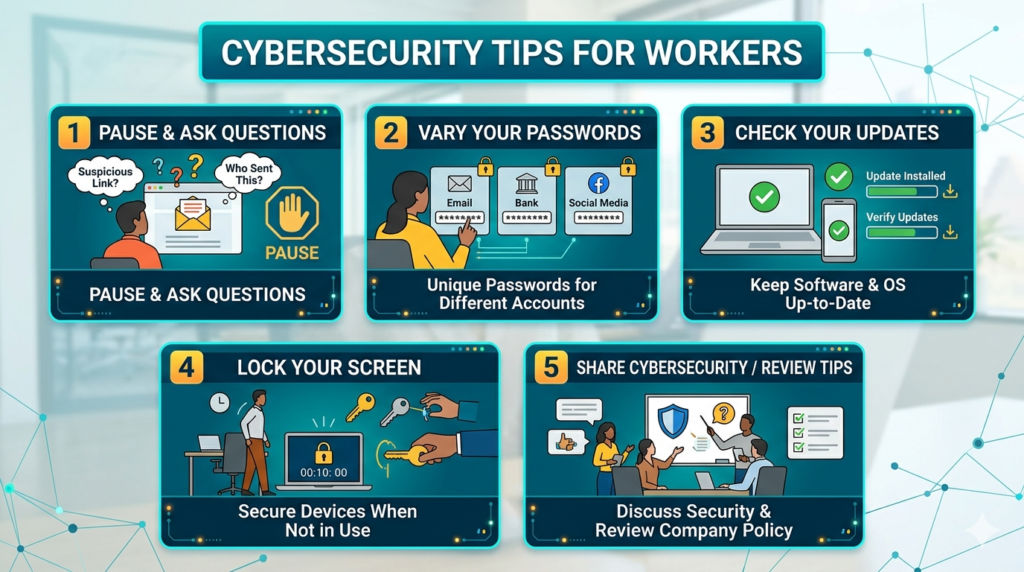
1. Create Strong and Unique Passwords
Passwords are among the most important security measures protecting online accounts. Weak or reused passwords can make it easier for attackers to gain unauthorized access to personal information.
A common mistake is using the same password for multiple websites and applications. If one platform experiences a data breach, attackers may try the exposed password on other services.
To improve password security:
- Create long passwords that are difficult to guess.
- Use a different password for every important account.
- Avoid personal information such as birthdays and names.
- Consider using a reputable password manager.
- Never share passwords through unsecured messages.
A password manager can generate and securely store unique passwords, making account management easier. Where supported, passkeys are another useful option for reducing reliance on traditional passwords.
2. Enable Multi-Factor Authentication
Multi-factor authentication (MFA) provides an additional layer of protection beyond a username and password. It requires users to complete another verification step before accessing an account.
Depending on the service, this may involve an authentication application, security key, biometric verification, or another approved method.
For example, someone attempting to access an email account may need both the correct password and an additional authentication approval. This makes unauthorized access more difficult, even if a password becomes exposed.
Enable MFA on important accounts, especially:
- Email and social media accounts.
- Online banking and payment services.
- Cloud storage platforms.
- Shopping accounts containing payment information.
- Business and professional applications.
Choose phishing-resistant authentication methods, such as security keys or passkeys, whenever available. Never share verification codes with anyone who contacts you unexpectedly.
3. Keep Devices and Software Updated
Software updates are essential for maintaining digital security. Operating systems, browsers, and mobile applications may contain vulnerabilities that attackers can exploit.
Developers regularly release updates to correct security weaknesses, improve performance, and fix technical problems.
Ignoring these updates can leave devices exposed to known threats.
Make software maintenance part of your regular cybersecurity routine:
- Enable automatic updates whenever possible.
- Update mobile phones, computers, and tablets.
- Keep internet browsers and applications current.
- Install security updates from official sources.
- Remove applications that are no longer needed.
It is also important to update smart devices, including security cameras, routers, and connected home equipment. Keeping software current helps reduce exposure to preventable security risks.
4. Learn to Recognize Phishing Scams
Phishing is a common cyberattack technique in which criminals use deceptive messages to trick people into sharing sensitive information or downloading harmful files.
These messages may appear to come from banks, delivery companies, government departments, employers, or popular online services.
A phishing message might claim that an account has been suspended or that an urgent payment is required. It may include a link to a fake website designed to collect login credentials or financial details.
Some warning signs include:
- Unexpected requests for passwords or verification codes.
- Messages creating unnecessary urgency.
- Unfamiliar or misspelled website addresses.
- Unexpected attachments.
- Offers that appear unusually attractive.
Always verify suspicious requests through official websites or trusted contact channels. Avoid opening unexpected attachments or clicking links simply because a message appears to come from a familiar organization.
Learning to recognize phishing attempts is one of the most valuable everyday cybersecurity practices.
5. Use Secure Internet Connections
Internet connections are an important part of digital security. Public Wi-Fi networks available in airports, hotels, restaurants, and shopping centers can introduce additional risks, particularly when users cannot verify how the network is managed.
Avoid accessing sensitive accounts through suspicious or unknown networks. If you need to use public Wi-Fi, confirm the network name with the venue and consider using a trusted virtual private network (VPN).
For home internet connections, take these precautions:
- Change the router’s default administrator password.
- Use strong Wi-Fi encryption.
- Set a unique network password.
- Keep router firmware updated.
- Disable unnecessary remote administration features.
A properly configured internet connection helps protect connected devices and reduces opportunities for unauthorized access.
6. Protect Your Personal Information on Social Media
Social media platforms allow people to share photographs, opinions, professional updates, and personal experiences. However, sharing too much information can create privacy and security problems.
Cybercriminals may use publicly available information to create convincing scams, impersonate individuals, or answer account security questions.
For example, regularly sharing birthdays, travel plans, personal contact information, and other identifying details may make it easier for strangers to gather information about you.
Improve social media privacy by:
- Reviewing account privacy settings.
- Limiting access to personal photographs and posts.
- Avoiding public sharing of sensitive information.
- Accepting connection requests only from people you recognize.
- Being cautious about location sharing.
Think carefully before publishing personal details online. Information shared publicly can be copied, saved, and distributed beyond its original audience.
7. Download Applications and Files from Trusted Sources
Downloading unfamiliar applications or files can expose devices to malware, spyware, and other security threats.
Some harmful programs disguise themselves as useful applications, free software, browser extensions, or attractive digital downloads.
To reduce these risks, download applications from official app stores or verified developer websites. Check application permissions before installation and avoid software that requests unnecessary access to personal information.
Additional precautions include:
- Review developer information and application ratings.
- Avoid suspicious download advertisements.
- Do not open unexpected email attachments.
- Remove applications you no longer trust.
- Use reputable security software when appropriate.
Being selective about downloads helps prevent unwanted software from entering your devices.
8. Back Up Important Files Regularly
Data loss can occur because of hardware failure, accidental deletion, ransomware, or other unexpected incidents. Losing important photographs, documents, financial records, or professional files can create serious difficulties.
Regular backups help ensure that important information remains recoverable.
Consider keeping backup copies of:
- Personal photographs and videos.
- Important documents.
- Business and educational files.
- Financial records.
- Contact information.
You can use secure cloud storage, external drives, or a combination of both. For better protection, keep at least one backup separate from your primary device and test occasionally that your files can actually be restored.
A consistent backup routine provides an additional layer of protection against unexpected data loss.
9. Review Account Activity and Privacy Settings
Many online services provide account activity reports, login histories, and security notifications. Reviewing these features can help identify unusual activity before it develops into a larger problem.
For example, an unexpected login notification from an unfamiliar location may indicate that someone has attempted to access your account.
Make it a habit to:
- Review recent login activity.
- Check connected devices and active sessions.
- Remove applications with unnecessary account access.
- Update account recovery information.
- Enable security notifications.
If you notice suspicious activity, change the affected password from the official website, terminate unfamiliar sessions, and review your authentication settings.
Regular account reviews help users maintain better control over their digital identities.
10. Be Careful with Online Payments and Shopping
Online shopping and digital payments have made financial transactions more convenient. However, fake stores, fraudulent payment pages, and misleading advertisements can put financial information at risk.
Before making an online purchase, verify that the website is legitimate and review its contact details, payment options, and return policies.
Follow these precautions:
- Use trusted shopping platforms.
- Check website addresses before entering payment details.
- Avoid sharing banking information through messages.
- Never disclose one-time banking verification codes.
- Monitor bank and payment account notifications.
- Use available transaction alerts.
Be especially careful with unexpected payment requests and offers that seem too good to be true. Taking a moment to verify a transaction can prevent avoidable financial losses.
11. Use Security Software and Device Protection
Security software can help identify malware, block suspicious activities, and protect devices from certain digital threats.
Modern computers and smartphones often include built-in security features. Users can strengthen protection by keeping these tools enabled and updated.
Useful security measures include:
- Reputable antivirus or endpoint protection software.
- Device firewalls.
- Screen locks and biometric authentication.
- Secure browser settings.
- Application permission controls.
Users should also avoid disabling security features without understanding the consequences. Combining built-in protection with responsible browsing habits creates a stronger defense against common threats.
12. Develop a Habit of Thinking Before Clicking
Many cybersecurity incidents begin with a seemingly ordinary action, such as opening an attachment, following an unfamiliar link, or responding to an unexpected message.
Cybercriminals often rely on curiosity, fear, excitement, and urgency to influence online decisions.
Before clicking, downloading, or sharing information, consider whether the request is expected and trustworthy.
If something seems unusual, pause and verify it independently. Visit the organization’s official website rather than following an unsolicited link, and contact the sender through a previously known communication channel.
This simple habit can help prevent phishing, fraudulent transactions, and accidental exposure of sensitive information.
Why Everyday Cybersecurity Practices Matter
Cybersecurity is not only a concern for large companies or technology professionals. Anyone who uses the internet can become a target of digital threats.
Good online security habits help individuals protect their identities, financial information, personal communications, and important files.
Consistent security practices also provide several long-term benefits:
Better Privacy: Limiting unnecessary information sharing helps protect personal details from misuse.
Reduced Financial Risks: Secure payment habits and account protection can reduce exposure to online fraud.
Improved Account Security: Strong passwords and multi-factor authentication make unauthorized access more difficult.
Safer Digital Experiences: Recognizing suspicious messages and downloads helps users avoid common online threats.
Greater Confidence: Understanding basic security measures makes it easier to use digital platforms responsibly.
These benefits demonstrate why cybersecurity should become a regular part of everyone’s digital routine.
Conclusion
Staying safe online requires more than installing security software or creating a strong password. It involves developing consistent habits that protect personal information, digital devices, and online accounts.
From enabling multi-factor authentication and updating software to recognizing phishing scams and backing up important files, small security actions can significantly improve digital protection.
The internet will continue to evolve, and cyber threats will become more sophisticated. However, individuals who remain informed, cautious, and proactive can reduce many common online risks.
By following these everyday cybersecurity practices, anyone can build safer browsing habits, protect their digital identity, and enjoy the benefits of technology with greater confidence.